
Your starting point
Use /locate structure for structures and /locate biome for biomes with an identifier valid for your edition. You need command permission and the appropriate dimension. /locate returns a location: it does not create buildings or make a coordinate a safe teleport destination.
In this guide
Choose what you want to locate
Start with your destination. A village is a structure; a cherry grove is a biome. The name after the subcommand must exist in your version.
For a village, read methods with and without commands. For cherry scenery, follow the biome and seed guide. This article covers the general command workflow.
| Destination | Java 1.19 or later | Current Bedrock | Dimension |
|---|---|---|---|
| Village | /locate structure #minecraft:village | /locate structure village | Overworld |
| Nether fortress | /locate structure minecraft:fortress | /locate structure fortress | Nether |
| Plains biome | /locate biome minecraft:plains | /locate biome minecraft:plains | Overworld |
Use the command in the right world
Enter the world you want to inspect and check your edition. The Java examples use the syntax introduced with 1.19; earlier releases may require a different command. Use chat suggestions to check the identifier accepted by your game.
- Check edition, version and whether you can run commands.
- Enter the destination’s dimension; do not search for a Nether fortress from the Overworld.
- Open chat, enter the appropriate command and read the full response.
- Record the dimension and returned coordinates alongside your starting position.
- Plan the journey in-game; do not invent a Y level for a teleport.
What the result means
A result helps orient your search within that world. It does not prove that a building is intact, that villagers remain or that a chest contains a particular item. Running the command again does not undo changes made by players.
Keep X and Z in the right order, including negative signs. When comparing with an external map, also check seed, version and dimension. Running the command elsewhere changes the search origin.
Tested in Minecraft Java 26.3
On 30 October 2026 we ran all three examples in a new seed 1 world with default generation. Village and plains searches started at X 152.5, Y 71, Z 159.5 in the Overworld. The fortress search started at X 0.5, Y 100, Z 0.5 in the Nether. These results apply to that version and those starting positions.
The test confirms command execution and output; it does not establish that the destination is safe to visit or teleport to. The separate Bedrock test follows below.
| Command | Dimension | Result |
|---|---|---|
| /locate structure #minecraft:village | Overworld | minecraft:village_plains at [640, ~, 816]; 818 blocks |
| /locate biome minecraft:plains | Overworld | [408, 71, 319]; 301 blocks |
| /locate structure minecraft:fortress | Nether | [-96, ~, 144]; 173 blocks |
Separate Bedrock 26.60 test
On the same day we tested all three Bedrock examples in another new seed 1 world with normal generation. Village and plains searches started at block X 150, Y 70, Z 173 in the Overworld; the fortress search started at 0, 100, 0 in the Nether. These coordinates are not compared with Java: each test has its own edition and origin.
With cheats disabled, Bedrock reported that cheats were not enabled in the world. With cheats enabled, the invented identifier minecraft:not_a_real_structure and a fortress search from the Overworld returned the same generic message saying no valid structure was found within a reasonable distance. Check both identifier and dimension; that response alone does not distinguish the causes. Testing the command does not expand seed map version support.
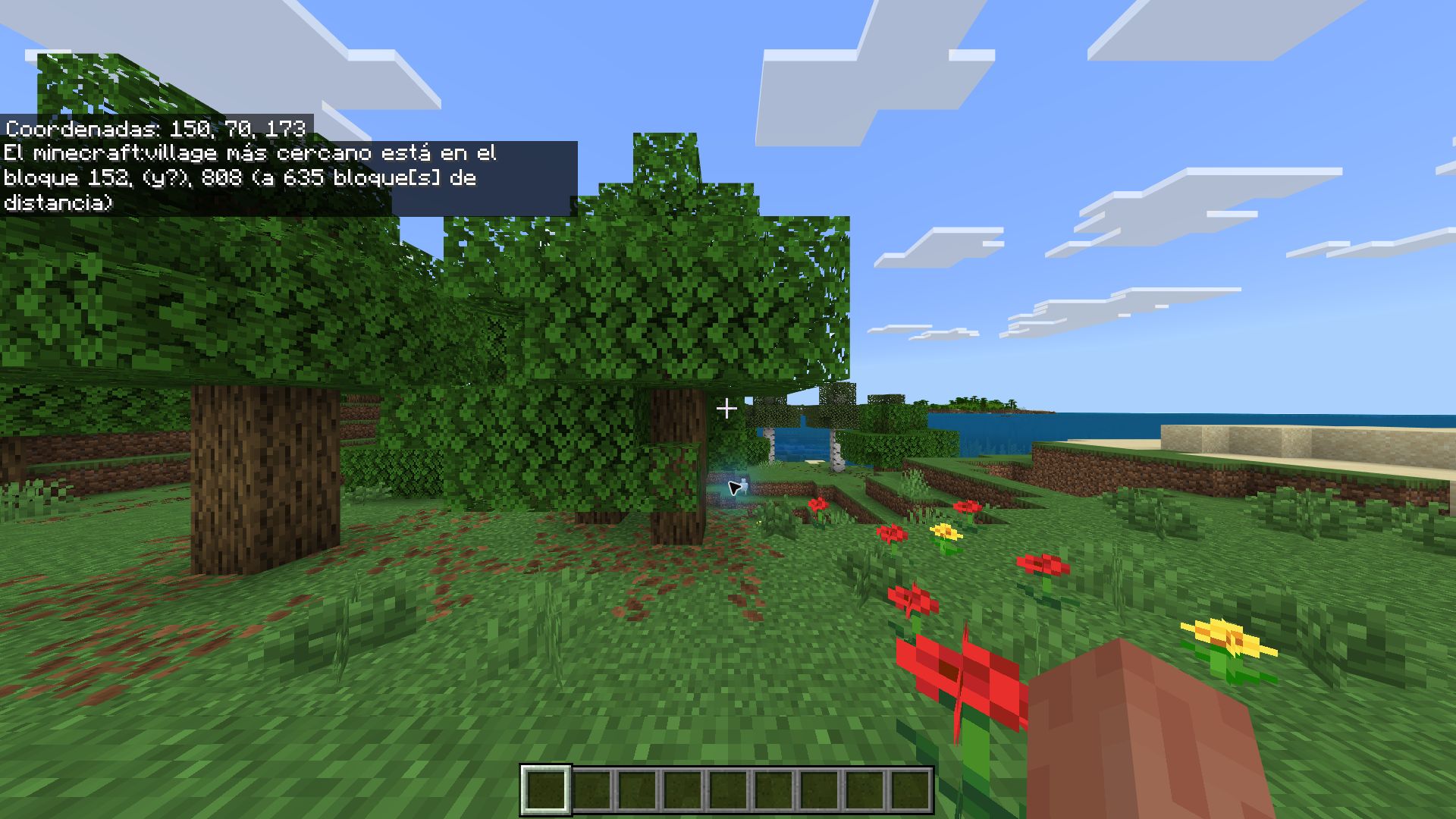
| Command | Dimension | Result |
|---|---|---|
| /locate structure village | Overworld | [152, (y?), 808]; 635 blocks |
| /locate biome minecraft:plains | Overworld | [-458, 68, -435]; 859 blocks |
| /locate structure fortress | Nether | [-336, (y?), 80]; 345 blocks |
If /locate is not working
Read the error before changing commands at random. An unknown identifier, insufficient permission and a search that finds nothing need different checks.
In our Java 26.3 test, the valid village command returned “Unknown or incomplete command” with Allow Commands disabled. Enabling commands in the same world made it work. When that message appears, check permission as well as syntax.
With permission enabled, minecraft:not_a_real_structure returned “There is no structure with type” and searching for minecraft:fortress in the Overworld returned “Could not find a structure”. The same fortress command found a destination in the Nether. These are different failures.
| What happens | What to check |
|---|---|
| You lack permission | Ask the owner or administrator; you do not need to change worlds to ask. |
| Unknown subcommand or target | Edition, version and chat suggestions; check names copied from another edition. |
| No destination found | Dimension and target; keep the response to distinguish it from a syntax error. |
| You arrive but do not recognize the place | Dimension, X/Z, actual height and player changes; inspect the surroundings. |
Source: Microsoft Learn — Bedrock /locate syntax, identifiers and permissions
Find places without commands
If you can access the seed, follow the seed lookup steps and check the combinations in map compatibility. The seed map needs those details; it does not retrieve a seed from a server name.
Without a seed or permission, explore in-game. The destination guides explain what to look for; there is no universal coordinate that works in every world.
Sources and review
Game information checked against the linked sources. Map steps were checked in this preview; its predictions remain experimental.